ℹ️ Disclaimer: This article is for general educational and informational purposes only. Tax laws, ITR forms, deadlines, deduction limits, and tax slabs change every year with the Union Budget and CBDT notifications. All information here is based on rules applicable for FY 2025-26 / AY 2026-27 at time of writing and may have changed. Always verify current rules on the official Income Tax portal (incometax.gov.in) or consult a qualified chartered accountant before filing. RozHisab is a personal finance tracking tool — not a tax advisory or CA service.
July 31 arrives every year with the same question from millions of salaried Indians:
"Do I actually need to file an ITR? Which form? What documents? Should I use old or new regime? What about my mutual fund gains? Is my refund coming or not?"
This guide answers every one of those questions — in order, step by step, without jargon — so you can file your ITR confidently before the deadline and without paying a rupee more tax than you legally owe.
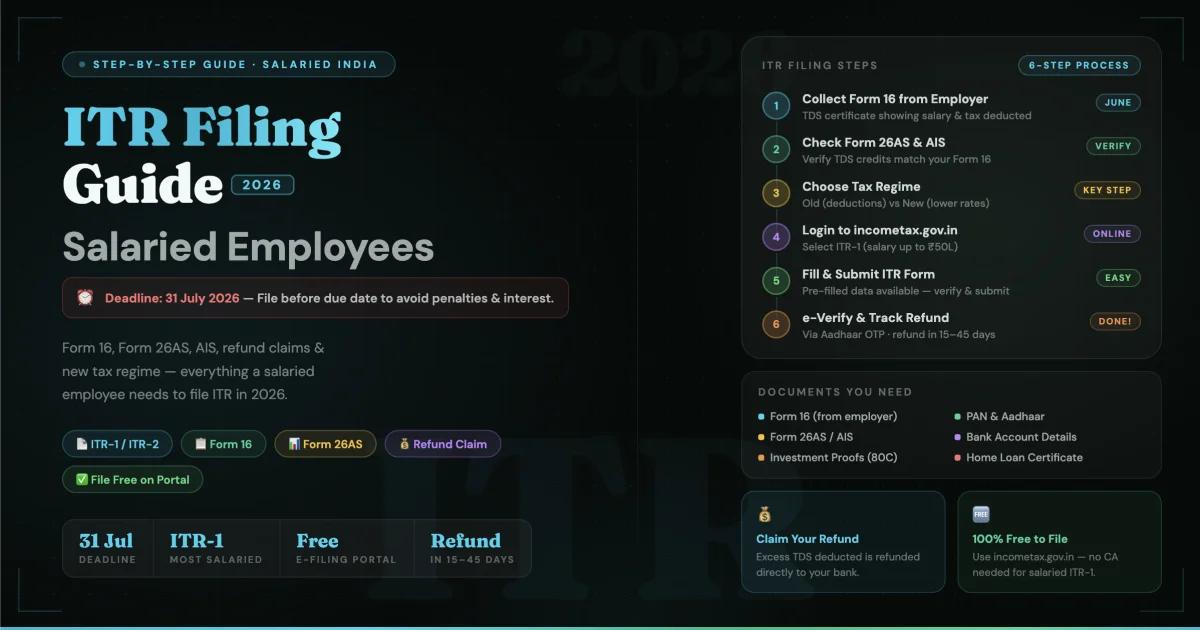
Step 1 — Know Your ITR Filing Due Date
Income Tax ITR Filing Due Date for Salaried Employees
For salaried individuals (not requiring audit), the ITR filing due date is:
July 31 of the Assessment Year
For FY 2025-26 (income earned
April 2025 – March 2026),
the Assessment Year is 2026-27,
and the due date is
July 31, 2026.
Has the ITR filing due date
been extended?
The government has extended the
ITR due date in several past years
(it was extended during COVID and
in years with portal technical issues).
Check the CBDT (Central Board of
Direct Taxes) website or
incometax.gov.in for the latest
notification closer to the deadline —
extensions are announced via
official press releases, not rumours.
What happens if you miss July 31:
- Belated return (August 1 – December 31): You can still file under Section 139(4) but with a late fee of ₹5,000 (reduced to ₹1,000 if total income is below ₹5 lakh)
- Loss of carry-forward benefit: If you have capital losses to carry forward against future gains, you lose this benefit if you file after July 31
- Interest on tax dues: If you owe tax and file late, interest under Section 234A accrues at 1% per month from August 1
- Can I file ITR for last 3 years now? You can file updated returns (ITR-U) for up to 2 previous assessment years from the current AY under Section 139(8A) — but with an additional tax of 25–50% on the tax and interest payable. The window is now 2 years, not 3, for updated returns.
Who MUST file ITR regardless of income level:
- Total income exceeds the basic exemption limit (₹3 lakh under new regime, ₹2.5 lakh under old regime)
- Deposited above ₹1 crore in bank accounts during the year
- Paid electricity bills exceeding ₹1 lakh in the year
- Foreign travel expenses above ₹2 lakh in the year
- TDS/TCS deducted above ₹25,000 (₹50,000 for senior citizens)
- Professional income above ₹10 lakh
Step 2 — Collect Your Documents Before You Start
Filing ITR without the right documents is the number one cause of errors, mismatches, and subsequent notices. Collect these before opening the portal:
Essential documents for every salaried employee:
- ✅ Form 16 from your employer (Part A and Part B — explained below)
- ✅ Form 26AS — Annual Tax Statement (download from incometax.gov.in)
- ✅ AIS (Annual Information Statement) — more comprehensive than 26AS, includes interest income, dividends, mutual fund transactions, property sale
- ✅ Bank account details (account number + IFSC for refund credit)
- ✅ PAN card
- ✅ Aadhaar linked to PAN (mandatory — ITR cannot be e-verified without it)
Additional documents if applicable:
- 📋 Interest certificates from banks/post office (for FD, savings interest)
- 📋 Mutual fund capital gains statement (download from CAMS/KFintech — camsonline.com or kfintech.com)
- 📋 Home loan interest certificate (from your bank for Section 24B deduction)
- 📋 Rent receipts (for HRA exemption if not processed by employer)
- 📋 Investment proofs for 80C (PPF passbook, ELSS statements, LIC premium receipts)
- 📋 Health insurance premium receipts (for Section 80D)
- 📋 Property sale deed (if you sold property during the year)
Step 3 — Form 16 Explained (Your Most Important Document)
What Is Form 16
Form 16 meaning: Form 16 is a TDS certificate issued by your employer under Section 203 of the Income Tax Act. It is a formal record of: (a) how much salary your employer paid you during the financial year, and (b) how much TDS (tax) they deducted from your salary and deposited with the Income Tax Department on your behalf.
Form 16 means you have a documented proof of income and tax payment — the foundation of your ITR filing.
Form 16 has two parts:
Part A — TDS details: Generated and downloaded from the TRACES portal by your employer. Shows quarter-wise TDS deducted and deposited, your employer's TAN, your PAN, and the acknowledgement numbers of TDS deposits. This is the government-verified part.
Part B — Salary breakup: Prepared by your employer. Shows your complete salary structure (basic, HRA, allowances), exemptions claimed (HRA, LTA), deductions declared (80C, 80D), and the final taxable income and tax computation. This is where your salary slip data is summarised for the full year.
How to Get Form 16
Form 16 download — the correct process:
- Form 16 is issued by your employer — not downloaded by you directly from the income tax portal
- Your employer's HR or payroll team generates it via the TRACES portal (tdscpc.gov.in) and issues it to you
- Deadline for employer to issue Form 16: June 15 every year
- If you haven't received it by June 15, formally request from HR in writing
How to get Form 16 online:
If your employer uses payroll software
(GreytHR, Darwinbox, SAP HCM),
it is usually available in the
employee self-service portal.
Log in → Payroll → Tax Documents →
Form 16 → Download PDF.
How do I get Form 16 online if I have changed jobs: Every employer you worked with during the financial year must issue a separate Form 16 covering the period of your employment with them. If you had two employers in FY 2025-26, you will have two Form 16s — both must be used while filing ITR.
Download Form 16 for salaried employees — what to verify once received:
- Your name and PAN match your PAN card exactly
- The TDS amount in Form 16 Part A matches what appears in Form 26AS (any mismatch requires correction by employer before you file)
- All exemptions you declared to HR (HRA, LTA, 80C investments) appear correctly in Part B
Form 26AS vs AIS — Know the Difference
Form 26AS shows: TDS deducted on your salary, FD interest, and other income — and whether it has been deposited by the deductor.
AIS (Annual Information Statement) shows everything Form 26AS shows PLUS: interest income from all sources, dividend income, mutual fund transactions (purchases and redemptions), property sale/purchase, foreign remittances, and more. Always verify your AIS before filing — it shows what the Income Tax Department knows about you.
Download AIS: incometax.gov.in → Login → AIS/TIS → View AIS → Download (JSON or PDF).
Step 4 — Choose Between Old and New Tax Regime
This is the most consequential decision in your ITR filing. Choosing the wrong regime costs real money — potentially ₹20,000–₹60,000+ for a person with significant deductions.
New Tax Regime — Tax Slabs 2026
What is the new tax slab (New Regime, FY 2025-26):
- Up to ₹4 lakh: Nil
- ₹4 lakh – ₹8 lakh: 5%
- ₹8 lakh – ₹12 lakh: 10%
- ₹12 lakh – ₹16 lakh: 15%
- ₹16 lakh – ₹20 lakh: 20%
- ₹20 lakh – ₹24 lakh: 25%
- Above ₹24 lakh: 30%
Union Budget highlights income tax slabs: Budget 2025 (presented February 2025) revised the new tax regime slabs significantly — the nil slab was extended to ₹4 lakh (from ₹3 lakh) and the rebate under Section 87A was enhanced. Check the Union Budget 2025 official announcement for the final confirmed slab structure as additional changes may apply.
What is rebate in income tax: Section 87A provides a tax rebate — meaning if your total taxable income is within a specified limit, your tax liability becomes zero even if the slabs suggest otherwise. Under the new regime, income up to ₹12 lakh (after standard deduction) effectively attracts zero tax due to the Section 87A rebate. This is one of the most significant benefits of the new regime for salaried employees in the ₹8–₹12 lakh income bracket.
Standard Deduction — The One Deduction Everyone Gets in Both Regimes
What is standard deduction: A flat deduction from your gross salary income — no bills, no receipts, no proof required. You get it automatically.
Standard deduction in salary: ₹75,000 per year for salaried employees (enhanced in Budget 2024 from ₹50,000).
Is standard deduction applicable in new tax regime? Yes — from FY 2024-25 onwards, the standard deduction of ₹75,000 is available under the new tax regime. This was a major change that made the new regime significantly more attractive.
Is standard deduction allowed in new regime? Yes — confirmed. ₹75,000 standard deduction is available to all salaried employees regardless of which regime they choose.
Standard deduction under Section 16(IA): This is the specific section under which the standard deduction operates — Section 16(IA) of the Income Tax Act.
What is standard deduction in income
tax with example:
Gross salary: ₹9,00,000/year
Standard deduction: ₹75,000
Taxable salary income: ₹8,25,000
This ₹75,000 reduction is automatic —
no action required from your side.
How to Save Tax in New Tax Regime
How to save tax in new tax regime — this is one of the most searched but least clearly answered questions in Indian personal finance. Here is the honest answer:
The new regime has fewer deductions than the old regime — most Section VI-A deductions (80C, 80D, 80E, etc.) are not available. However, these deductions ARE available under the new regime:
- ✅ Standard deduction: ₹75,000
- ✅ Employer's NPS contribution under Section 80CCD(2): Up to 14% of basic salary — this is the most powerful tax saving tool in the new regime. Ask your employer to restructure a portion of your CTC as NPS employer contribution — it reduces your taxable salary significantly without reducing your total pay.
- ✅ HRA exemption: Still applicable if you receive HRA and live in rented accommodation
- ✅ Section 10 exemptions: Gratuity, VRS, leave encashment within specified limits
- ✅ Home loan repayment under Section 24B: Interest on home loan for self-occupied property is deductible up to ₹2 lakh (available in old regime — not in new regime for self-occupied property)
How can we save tax on salary —
new regime strategy:
The single most impactful action
in the new regime is maximising
employer NPS contribution under 80CCD(2).
If your employer contributes 14% of
your basic salary to NPS,
and your basic is ₹40,000/month,
that is ₹67,200/year of tax-free
salary restructuring.
This is available in the new regime
and is more valuable than most
old-regime deductions for many employees.
How to save property gain tax: If you sold property during the year, the capital gain can be reduced by reinvesting in another property under Section 54, or in specified bonds under Section 54EC. See the capital gains section below.
Old vs New Regime — When Old Regime Is Still Better
Old regime is typically better if your total deductions exceed ₹3.75 lakh:
- HRA exemption: significant amount
- 80C: ₹1.5 lakh
- 80D (health insurance): ₹25,000–₹75,000
- Home loan interest (24B): up to ₹2 lakh
- NPS under 80CCD(1B): ₹50,000
For a person with a home loan, HRA exemption, NPS investment, and full 80C utilisation, the old regime often results in lower total tax even with higher slab rates.
The correct approach: Calculate your tax in both regimes using the income tax calculator at incometax.gov.in and choose whichever gives lower tax. You can switch regime every year when filing ITR (if you have only salaried income — those with business income have restrictions on switching).
Step 5 — Which ITR Form to File
Which ITR Form to File — The Complete Decision Guide
ITR-1 (Sahaj) — Most salaried employees:
Use if:
Total income up to ₹50 lakh,
income only from salary + one house property +
other sources (interest, dividends),
no capital gains, not a director,
no foreign assets.
ITR-2 — Salaried with capital gains:
Use if:
You have capital gains from
mutual funds, shares, or property sale,
OR income from more than one house property,
OR income from foreign sources/assets,
OR you are a director in any company.
Most mutual fund investors
who redeemed units during the year
need ITR-2, not ITR-1.
ITR-3 — Salaried with business income:
Use if you have income from business
or profession in addition to salary.
ITR-4 (Sugam) — Presumptive taxation:
Use if income is from business/profession
under presumptive taxation scheme
(Section 44AD/44ADA/44AE).
Not typically relevant for
pure salaried employees.
ITR-1 vs ITR-4 — Key Difference
ITR-1 is for salaried individuals with no business income. ITR-4 is for individuals with business income under the presumptive taxation scheme. A salaried employee with a small freelance income should use ITR-3 (not ITR-4) unless they opt for presumptive taxation under 44ADA.
Difference Between ITR-1 and ITR-2
The single biggest differentiator: capital gains. ITR-1 cannot be used if you have any capital gains income. If you redeemed mutual funds, sold shares, or sold property during FY 2025-26 — you must use ITR-2 even if your total income is below ₹50 lakh.
ITR 1 2 3 4 — Quick Reference
- 📋 ITR-1: Salary + interest + one house property. No capital gains. Income ≤ ₹50 lakh.
- 📋 ITR-2: Salary + capital gains + multiple properties + foreign income/assets. Any income level.
- 📋 ITR-3: Salary + business/professional income.
- 📋 ITR-4: Presumptive business income (44AD/44ADA) + salary. Income ≤ ₹50 lakh.
Step 6 — Capital Gains — What Every Mutual Fund Investor Must Report
What Is TDS in Income Tax — And How It Relates to Capital Gains
What is TDS in income tax: TDS (Tax Deducted at Source) is tax deducted by the payer before making a payment to you. For salaried employees, your employer deducts TDS from salary monthly. For mutual fund and share income, TDS may be deducted on dividends. For interest income, banks deduct TDS on FD interest above ₹40,000/year (₹50,000 for senior citizens).
Capital gains from mutual fund redemption or share sale are generally NOT subject to TDS for resident individuals — but they must be reported in ITR and tax paid through advance tax or self-assessment tax.
Short Term Capital Gains Tax
What is short term capital gain: Gains from selling an asset held for less than the specified holding period.
Short term capital gain on shares:
- Equity shares and equity mutual funds held for less than 12 months: STCG taxed at 20% (revised from 15% in Budget 2024, effective July 23, 2024)
- Debt mutual funds, gold, property held less than 36 months (3 years): Taxed at your income slab rate
Long Term Capital Gain
Long term capital gains tax:
- Equity shares and equity mutual funds held for 12+ months: LTCG taxed at 12.5% on gains exceeding ₹1.25 lakh per year (the ₹1.25 lakh exemption is for equity LTCG — revised in Budget 2024)
- Property held for 24+ months: LTCG at 12.5% without indexation (changed from 20% with indexation in Budget 2024 for sales after July 23, 2024)
Capital Gain on Sale of Property — How to Compute
How to compute capital gain
on sale of property:
Capital Gain = Sale Price −
(Cost of Acquisition + Cost of Improvement
+ Cost of Transfer)
How is capital gains tax calculated
on sale of property — example:
Property purchased 2019: ₹55 lakh
Stamp duty + registration: ₹3.5 lakh
Renovation: ₹2 lakh
Total cost: ₹60.5 lakh
Sale price 2026: ₹92 lakh
LTCG = ₹92L − ₹60.5L = ₹31.5 lakh
LTCG tax at 12.5% = ₹3.93 lakh
How to save property gain tax —
Section 54:
Invest the capital gain amount
in another residential property
within 2 years (purchase) or
3 years (construction) →
capital gain is exempt.
Or invest up to ₹50 lakh in
Section 54EC bonds (NHAI/REC)
within 6 months of sale →
exempt up to ₹50 lakh.
Consult a CA for your specific situation.
Step 7 — File Your ITR Online (Step by Step)
The complete online filing process:
- Go to incometax.gov.in → click "Login" → enter PAN as user ID + password → login
- Go to e-File → Income Tax Returns → File Income Tax Return
- Select Assessment Year: For income earned in FY 2025-26, select AY 2026-27
- Select mode: Online (recommended — pre-fills salary, TDS, and AIS data automatically)
- Select ITR form: ITR-1 (no capital gains) or ITR-2 (with capital gains) based on Step 5 above
- Verify pre-filled data: The portal pre-fills your salary from Form 16, TDS from 26AS, and interest/dividend income from AIS. Never submit without verifying every pre-filled field against your own documents. Errors in pre-filled data are your responsibility to correct.
- Enter regime choice: Old or New Tax Regime — the portal calculates tax for both after you enter all income. Review both before selecting.
- Add deductions (old regime only): Enter 80C investments, 80D premium, home loan interest, HRA exemption — only if choosing old regime
- Compute tax and pay if required: If any tax is due (beyond TDS already paid), pay via "e-Pay Tax" before submitting. Submitting with outstanding tax due triggers interest and penalties.
- Submit and e-Verify: After submitting, e-verify within 30 days. Options: Aadhaar OTP (fastest — instant verification), Net Banking, Bank Account Validation, or send signed ITR-V to CPC Bangalore by post (slowest — avoid unless necessary)
✅ Filing is complete only after e-verification — submission without verification means ITR is not processed.
Step 8 — Income Tax Refund — Tracking Status and Why It Delays
Income Tax Refund Delay — The Most Common Reasons
Filed your ITR weeks ago and the refund hasn't come? Here are the documented reasons for income tax refund delay:
- Bank account not pre-validated: The most common reason. Your bank account must be pre-validated on the income tax portal before the refund can be credited. incometax.gov.in → Profile → My Bank Account → Add Bank Account → Validate.
- PAN not linked to bank account: Your bank account and ITR must both be under the same PAN.
- Outstanding demand from previous year: If you have an unresolved tax demand from a previous year, the department may adjust your current refund against that demand without notice. Check "Pending Actions" on the portal.
- ITR selected for scrutiny: A small percentage of ITRs are selected for verification — this delays processing significantly.
- High volume at deadline: ITRs filed close to July 31 take longer to process than those filed in May–June when volumes are lower.
How to Check Refund Status in Income Tax Portal
Method 1 — Income Tax Portal:
- incometax.gov.in → Login → e-File → Income Tax Returns → View Filed Returns
- Select the relevant AY → click on refund status
- Status will show: Refund Issued (with date), Refund Failure (with reason), or Under Processing
Method 2 — NSDL Refund Status: tin.tin.nsdl.com/oltas/refund-status-pan.html → enter PAN + Assessment Year → check status directly
Income tax refund pending — what to do: If refund shows "Pending" for more than 60 days after e-verification, raise a grievance on the portal: incometax.gov.in → Grievance → Submit Grievance → select "Refund" as the category.
Step 9 — Income Tax Notices — What They Mean and How to Respond
⚠️ If you receive an income tax notice, consult a chartered accountant before responding. The information below is general educational content — not legal advice for your specific notice.
Income Tax Notice Section 142(1) — What It Means
Income tax notice section 142(1) is an inquiry notice — the Income Tax Officer asks you to: (a) file your return if you haven't, or (b) produce specific accounts, documents, or information to support your filed return.
This is NOT an accusation of wrongdoing — it is a request for information. The correct response is to respond within the specified time (shown in the notice) through the income tax portal under "Pending Actions → Response to Outstanding Demand / Notice."
Non-response to a 142(1) notice leads to best judgement assessment by the officer — which can result in a tax demand significantly higher than actual liability.
Income Tax Demand Notice 143(1) — The Most Common Notice
Income tax demand notice 143(1) is an intimation under Section 143(1) — the most common notice received by salaried taxpayers. It is an automated communication from CPC (Centralized Processing Centre) showing the result of processing your ITR against their records.
Three possible outcomes of 143(1):
- Refund due: Your refund will be credited shortly
- No demand, no refund: Your ITR is processed, everything matches
- Demand raised: A discrepancy was found — for example, TDS claimed in ITR doesn't match Form 26AS, or income reported doesn't match AIS data
What to do when you get a 143(1) demand notice:
- Download the intimation from the portal
- Compare the department's computation with your own filed return line by line
- If you agree with the demand — pay immediately via e-Pay Tax to avoid further interest
- If you disagree — file a "Response to Outstanding Demand" on the portal explaining the discrepancy with supporting documents
- If the demand is due to a genuine mistake in your ITR — file a revised return (only possible before December 31 of the assessment year)
Income Tax Scrutiny Notice (Section 143(2)) — The Serious One
Income tax scrutiny notice under Section 143(2) means your ITR has been selected for detailed scrutiny assessment.
Income tax scrutiny assessment involves the assessing officer examining your return in detail — asking for supporting documents, bank statements, investment proofs, and explanations for specific transactions.
Triggers for scrutiny selection (commonly):
- High-value cash deposits not matching declared income
- Significant capital gains without corresponding investment proofs
- Large deductions relative to income
- Income significantly lower than what AIS data suggests
- Multiple years of losses reported
What to do: A 143(2) notice MUST be responded to within the specified timeframe (typically 15–30 days). Engage a chartered accountant immediately — do not attempt to respond to a scrutiny notice without professional guidance.
Track Your Tax Documents and Returns Year-Round
The annual ITR filing panic is caused by one underlying problem: financial information is scattered across multiple platforms and documents — salary slips with HR, Form 16 in email, investment proofs with the insurance agent, mutual fund statements with the broker, and bank statements with the bank.
When July arrives, assembling all this information from scratch takes more time than the actual filing process — and the scramble leads to errors, missed deductions, and last-minute decisions.
Use RozHisab to track your income, investments, and major financial transactions throughout the year — not just in June–July. Log your monthly salary (net and gross), track SIP and investment contributions as you make them, record property-related income and expenses, and see your complete financial picture in one place.
When June arrives and it's time to file, you already know your approximate taxable income, your total 80C investments, your capital gains from mutual fund redemptions, and your savings rate — because you've been tracking all year. The filing becomes a 30-minute exercise rather than a 3-day document hunt.
👉 Start tracking your finances year-round at RozHisab — so next year's ITR filing is the easiest thing you do in July.
Quick Reference — ITR Filing 2026 Cheatsheet
- 📅 ITR filing due date: July 31, 2026 for salaried employees (AY 2026-27)
- 📋 Form 16 download: Request from HR/payroll by June 15 — verify against Form 26AS before filing
- 📝 Which ITR to file: ITR-1 (no capital gains) or ITR-2 (capital gains from MF/shares/property)
- 💰 Standard deduction: ₹75,000 — available in BOTH old and new regime
- 🏷️ Section 87A rebate: Income up to ₹12 lakh effectively zero tax in new regime
- 📈 STCG on equity: 20% (held under 12 months)
- 📈 LTCG on equity: 12.5% above ₹1.25 lakh exemption (held 12+ months)
- 🏠 LTCG on property: 12.5% without indexation (held 24+ months)
- 📬 Income tax notice 143(1): Automated intimation — respond on portal if demand raised
- 🔍 Income tax scrutiny notice 143(2): Engage CA immediately — respond within deadline
- 💸 Refund delay: Pre-validate bank account, check 26AS, raise grievance after 60 days
- 📱 Track year-round: Log income and investments on RozHisab — make next year's filing effortless
📌 Disclaimer: This article is for educational and informational purposes only. Tax laws, ITR forms, deadlines, deduction limits, capital gains tax rates, and notice response procedures change every year with Union Budget amendments and CBDT notifications. All information here is based on rules available at time of writing (March 2026) for AY 2026-27 and may have been updated since. Always verify current rules on incometax.gov.in and consult a SEBI-registered investment advisor or qualified chartered accountant before making any tax-related decisions. RozHisab is a personal finance budgeting tool — not a tax filing service or CA substitute.
Track your own finances — free forever
Use RozHisab to apply everything in this article to your actual spending and savings.
Start Tracking Free →